For a long time, ClickUp was my home base. All my smaller client projects, the ones where clients didn’t have their own task management setup, lived in my ClickUp workspace. I did my planning there, my timeboxing, my time tracking. It was the one place I could look at and know what my day looked like.
Then one of my bigger clients started using Notion. Not a big deal at first. I just manually copied their important tasks into ClickUp so I could keep planning in one place. But “manually copied” is doing a lot of heavy lifting in that sentence. It meant checking Notion every day, comparing it to what I had in ClickUp, updating statuses in both places, and hoping nothing fell out of sync. It always fell out of sync.
I was spending real time every week just keeping two tools aligned. Not doing work. Managing the fact that my work lived in two places.
The moment it broke
The system held together until one of my clients grew. They’d been working inside my ClickUp workspace, but they reached the point where they needed their own. So we migrated their tasks to a separate workspace.
And just like that, my day planning fell apart.
I couldn’t see their tasks alongside everything else anymore. I couldn’t timebox my day the way I’d been doing. My entire workflow, the one I’d spent months building inside ClickUp, stopped working because one client moved to their own workspace.
That was the aha moment. I realised this wasn’t a one-time problem. If I took on a new client tomorrow who used Jira, I’d be in the same situation. Except Jira doesn’t even offer the same planning features ClickUp does. The tools my clients use would always be outside my control, and my ability to plan my own day shouldn’t depend on all of them using the same platform.
The real cost of tool sprawl
If you’re a freelancer, you’ve probably felt some version of this. Maybe your stack is different (Linear instead of Notion, Asana instead of ClickUp) but the underlying problem is the same.
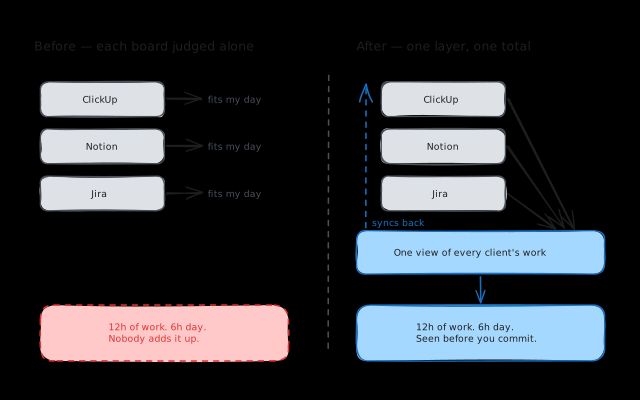
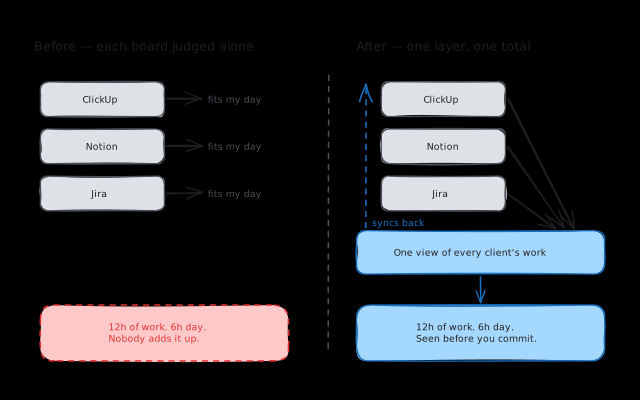
You can’t see your total workload. When tasks live in separate tools, you evaluate each client’s work in isolation. Client A’s board looks manageable. Client B’s board looks manageable. But add them together and you’ve got 12 hours of work crammed into a 6-hour focus day. You don’t realise it until you’re behind.
Your mornings start with admin, not work. Instead of diving into the first task, you’re opening three tools, scanning for updates, mentally merging priorities. By the time you’ve figured out what to do first, you’ve burned 30 minutes and half your motivation.
Tasks slip through the cracks. That request a client mentioned in Slack? The task that got added to their Notion after you did your morning sync? If it’s not in your primary tool, it’s invisible. And invisible tasks become missed deadlines.
Context switching compounds. Every time you leave your editor to check a different project management tool, there’s a re-engagement cost. Research suggests it takes around 23 minutes to fully refocus after a context switch. A few tool checks throughout the day can quietly eat hours.
The workarounds I tried (and why they fell short)
Manual syncing
This is what I did with Notion. Copy tasks into ClickUp by hand, update statuses in both places. It works for a while, but it’s time-consuming and always drifts out of sync. The moment you skip a day, your “source of truth” isn’t true anymore.
ClickUp’s built-in sync
I tried ClickUp’s own sync features, but they’re designed for teams, not freelancers pulling from external workspaces. It synced way too much information, treating my personal workspace like a team workspace and flooding it with stuff I didn’t need.
Zapier
Zapier technically worked. I could get tasks flowing from one tool to another. But learning and maintaining a third-party automation tool just so my basic workflow exists? That felt wrong. I’m a freelancer trying to get work done, not a systems integrator. And when a Zap breaks, tasks silently stop syncing. You don’t find out until something’s overdue.
”Just check everything”
The fallback: open every tool multiple times a day and keep it all in your head. This works in the sense that nothing gets missed, but it means constant context switching and zero unified prioritisation. Your brain becomes the integration layer, and that’s exhausting.
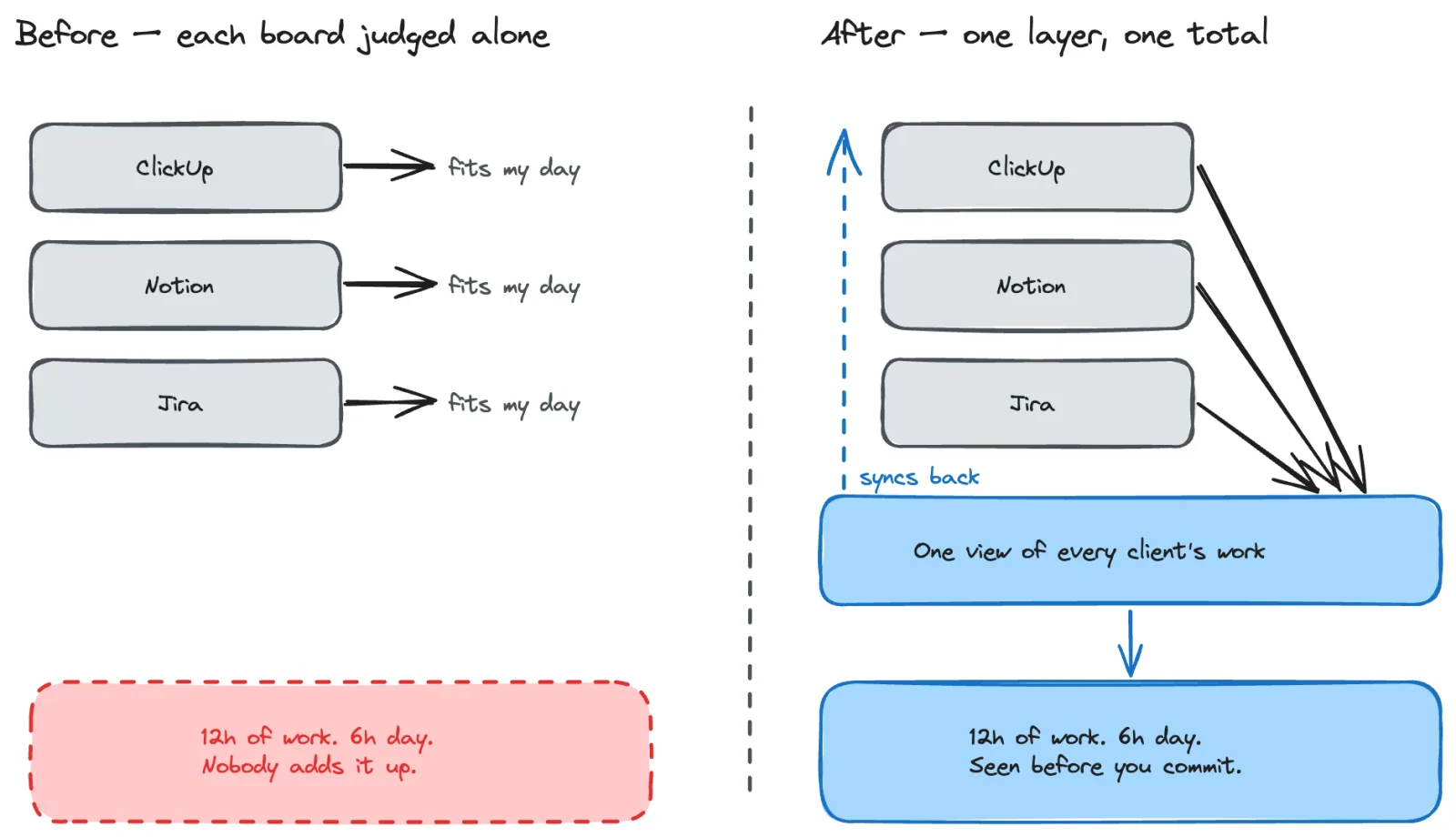
What actually works: a personal aggregation layer
After going through all of this, the pattern became clear. The solution isn’t to get all your clients onto one tool (that’ll never happen). It’s to add a personal layer on top of whatever tools they use.
The idea is simple:
- Connect to your clients’ tools. ClickUp, Notion, Linear, Jira, whatever they use.
- Pull all tasks into a single view, organised by client.
- Plan your day from that unified view, seeing your real total workload.
- Sync changes back. When you update a status, it flows back to the original tool.
For this to actually work, a few things are non-negotiable:
- Bidirectional sync. One-way sync just creates stale data with extra steps.
- Real-time updates. You need to trust that what you’re looking at is current.
- Day planning built in. Seeing all your tasks is step one; deciding what to do today is the actual goal.
Practical tips if you’re stuck with the juggle right now
If you’re not ready to change tools, here’s what helped me most:
Pick one place for your daily plan. It doesn’t matter which tool. Just decide that every morning, you’ll write down today’s tasks in one place. Even a plain text file works. The point is to make your prioritisation decisions once, not continuously.
Time-block by client. Instead of bouncing between clients all day, dedicate chunks of time to each. Open their tool at the start of the block, work through tasks, then switch. Fewer transitions, deeper focus.
Do a 5-minute morning scan. Open each tool once, pull out today’s priorities, write them in your daily plan. Then close the tools and work from the plan, not from the tools.
Reconcile at end of day. Spend a few minutes updating each tool with your progress. It keeps things in sync without the constant checking.
Why I’m building Koaline
This problem, the multi-tool chaos of freelancing, is exactly why I’m building Koaline. It connects to Linear, ClickUp, and Notion (with Jira, Todoist, Asana, Trello, and TickTick on the way) with full bidirectional sync — and you can connect multiple instances of the same provider.
All your tasks from all your clients show up in one workspace. You plan your day from a single view. When you mark something done, it syncs back. Your clients never need to know or care. If you want the details, here is how two-way sync works, and how Koaline sits next to Linear.
I built it because I needed it. If any of this sounds familiar, try Koaline — it’s open and free while in beta.
Related reading:
- The Plan-Execute-Reflect Framework: A Daily Workflow for Freelancers - A simple daily structure that turns reactive work into intentional work.
- Why Day Planning Beats To-Do Lists for Freelancers - Why “what am I doing today?” matters more than “what needs doing?”
- How to Stop Overcommitting as a Freelancer - When you can’t see your total workload, you say yes too much.