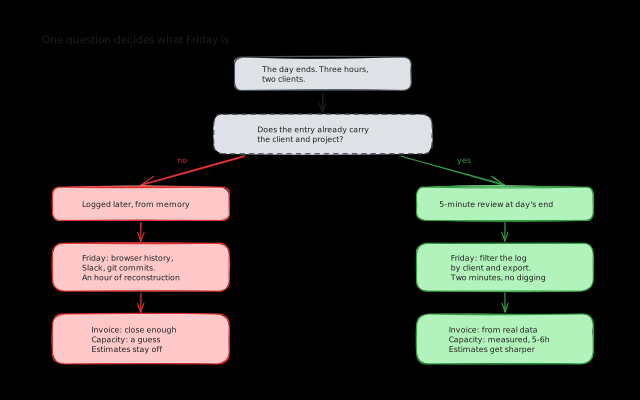
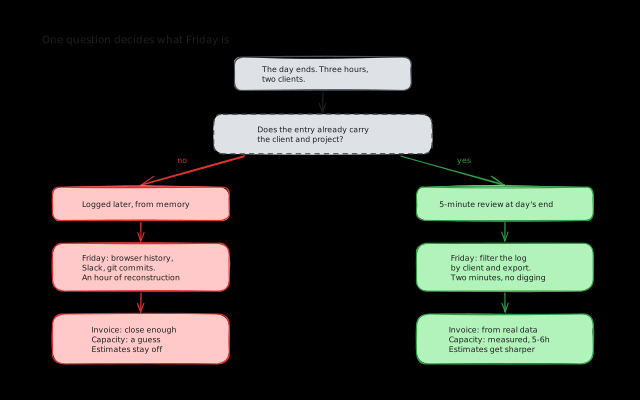
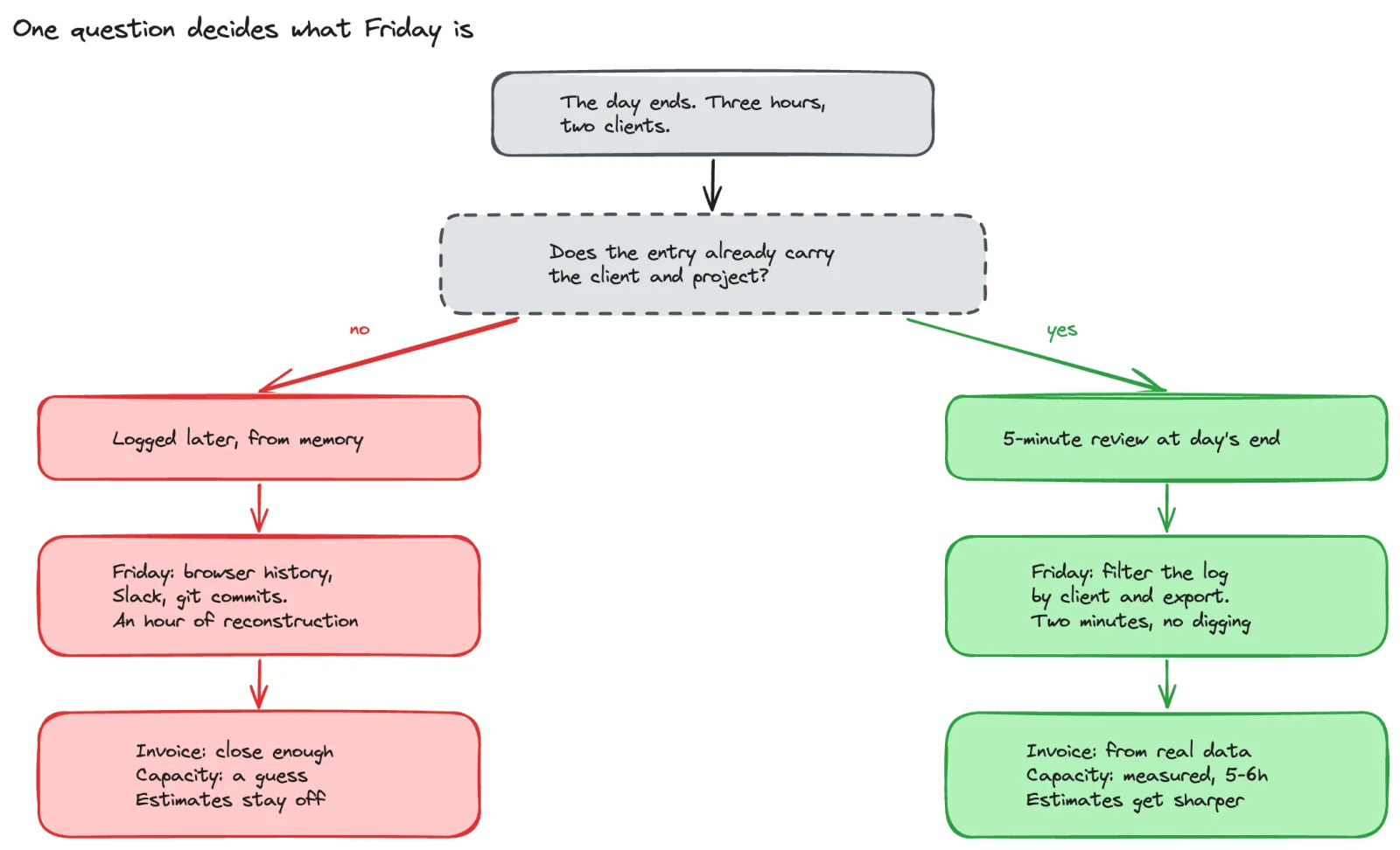
For a long time, my Friday afternoons looked like this: open ClickUp’s time tracking, find gaps everywhere. Monday has 3 hours logged. Tuesday has nothing. Wednesday has one entry that says “dev work” with no client attached. Then I’d do what every freelancer has done at some point. Open browser history, check Slack messages, look at git commits, and try to piece together where my week actually went.
An hour later I’d have something that was probably close enough, send the invoices, and move on. It worked, but it always felt like guesswork.
What changed: Rize + ClickUp
The thing that fixed the Friday scramble for me was Rize. It’s an automatic time tracking tool that runs in the background and tracks which apps and projects you’re working in throughout the day. You don’t have to start or stop anything. It just watches what you’re doing and categorises it.
At the end of each day, I’d check Rize to see where my time actually went, then log the hours in ClickUp. ClickUp gave me the nice monthly reports I needed for invoicing, and Rize gave me the visibility to fill in those reports accurately instead of guessing.
That combination worked really well. Rize solved the “I forgot to track” problem, and ClickUp gave me the client and project structure I needed for billing.
Why tracking matters even if you’re not billing hourly
I work with a mix of billing arrangements. Some clients are retainers, some are project-based, some are billable hours. So time tracking isn’t always about invoicing.
Even on retainer or fixed-price projects, knowing where your time goes is valuable:
You learn your real capacity. I thought I had about 8 hours of productive time per day. The data showed it was closer to 5-6. Once I started planning around that real number instead of the theoretical one, I stopped overcommitting. I wrote more about that in how I stopped saying yes to everything.
You spot unprofitable clients. I had one client where the work itself was fine, but the constant context switching was eating into my time for other projects. Same amount of money, but my other projects became more stressful to finish on time because of it. I wouldn’t have noticed that without tracking. That visibility helped me make the decision to let that client go.
Your estimates improve. When you can look back and see that “quick bug fix” tasks consistently take 2-3 hours instead of the 1 hour you quoted, you start quoting more honestly. Better estimates mean fewer surprises for everyone.
The different approaches and what I think of them
Automatic tracking (Rize, RescueTime)
This is what worked best for me as a base layer. Zero effort during the day. It captures everything, so you never have that “what did I do on Tuesday?” problem.
The limitation is that it knows you spent 3 hours in VS Code, but it doesn’t always know which client’s code you were working on. You still need to do some manual allocation at the end of the day. But allocating from real data is a lot easier than reconstructing from memory.
Timer-based (Toggl, Clockify, Harvest)
Start a timer when you begin a task, stop it when you finish. Accurate when you remember to do it, which is the whole problem. If you forget to start the timer, the time is lost. If you forget to stop it, you get inflated entries.
I tried this approach and it just didn’t stick. The constant start/stop interaction is a small interruption, but when you’re switching between tasks and clients throughout the day, it adds up. And on the days I was deep in flow, I’d forget about the timer entirely.
Plan-based (estimate then reconcile)
The idea here is that you estimate during morning planning, then compare estimated vs actual at the end of the day. In theory it’s elegant because planning and tracking happen together.
In practice, I think this only works if you’re already really good at estimation. If your estimates are consistently off (and most people’s are, especially early on), your tracking inherits those errors. It’s a nice complement to other tracking, but I wouldn’t rely on it as the only source of truth.
Spreadsheets
Simple, flexible, free. Works fine with 1-2 clients if you’re disciplined. Falls apart at 3+ clients or the first week you skip logging. I started here and outgrew it quickly.
What actually works: low-friction logging tied to your tasks
After trying all of these, here’s what I think matters most:
Tracking should require as little effort as possible during the day. The more friction there is, the more likely you skip it. Automatic background tracking (like Rize) solves this. So does having a simple timer built into whatever tool you’re already working in.
Time entries need client and project context automatically. An entry that says “coding, 3 hours” is useless for invoicing and analysis. If your tasks already have a client and project attached (because they were pulled from a client’s tool), the time entry should inherit that context without you tagging it manually.
End-of-day reconciliation is more realistic than real-time logging. For me at least. I’d rather spend 5 minutes at the end of the day reviewing and adjusting than try to perfectly log every transition throughout the day.
What I’m building into Koaline
Time tracking in Koaline is designed around low friction. Because your tasks are already organised by client and project (pulled from their tools with bidirectional sync), every time entry automatically carries that context. You don’t tag things manually. The time log on the features page shows what that looks like.
You can start a timer on a task if you want real-time tracking, or log time manually at the end of the day. Either way, the client and project context is already there. At the end of the month, pulling a report for a specific client is just a filter, not an archaeological expedition.
The goal is to make time tracking something that happens naturally as part of your day, not a separate chore you dread and eventually stop doing.
If the Friday invoice scramble sounds familiar, try Koaline — it’s open and free while in beta — or reach out at david@koaline.app.
Related reading:
- How I Manage Multiple Clients as a Freelance Developer - The systems behind managing multiple clients at once.
- How I Learned to Stop Saying Yes to Everything - Why knowing your real capacity changes how you plan.
- To-Do Lists vs Day Planning: You Need Both - When a simple list is enough and when you need a real plan.