Most productivity advice tells you to pick a system and stick with it. “Stop using to-do lists, start day planning.” Or “time blocking is the only way.” Or “just use a simple checklist and stop overcomplicating things.”
Here’s my take: sometimes a to-do list is exactly what you need. You have five things to do, you go through them, you tick them off. Done. No need for time estimates, no need for a timeline, no need for a system.
Other days, you have back-to-back client work, a call in the afternoon, three tasks that all feel urgent, and you really need to be on top of things. On those days, a to-do list doesn’t cut it. You need to plan out your day, schedule your work, and know at any point whether you’re on track.
The trick isn’t choosing one approach over the other. It’s knowing when you need which.
When a to-do list is enough
A to-do list works when your day is relatively simple. One or two clients, clear priorities, no meetings pulling you in different directions. You know what needs to happen, and you just need to work through it.
I still have a backlog that looks like a classic to-do list. Right now it probably has more items than I’d like to admit. Some are still relevant and will get done someday. Some were written down because they weren’t important enough to do immediately but still needed capturing. Some aren’t relevant anymore and I should clean them out.
That’s fine. A backlog is supposed to be messy. It’s a holding area, not a commitment. The mistake is treating it as your daily plan.
When you need a real plan
The moment your day gets complex (multiple clients, tight deadlines, interruptions, meetings scattered through the day) a to-do list stops being useful. You need something that accounts for time.
Here’s the difference for me. A to-do list answers “what needs to happen?” A day plan answers “what am I doing, when, and does it all fit?”
On days where I plan properly, I drag tasks onto a timeline and schedule them around my calendar. If I have a client call at 2pm and another at 4pm, I know I have a block in the morning and a block between calls. I slot tasks into those blocks based on priority and how long they’ll take.
One thing that matters here: estimates and scheduled time are not the same thing. I might estimate a task will take 50 minutes, but schedule it as two 25-minute blocks if that’s how it fits around my meetings. The estimate is about the work. The schedule is about when the work happens in my day. Both are useful, but they serve different purposes.
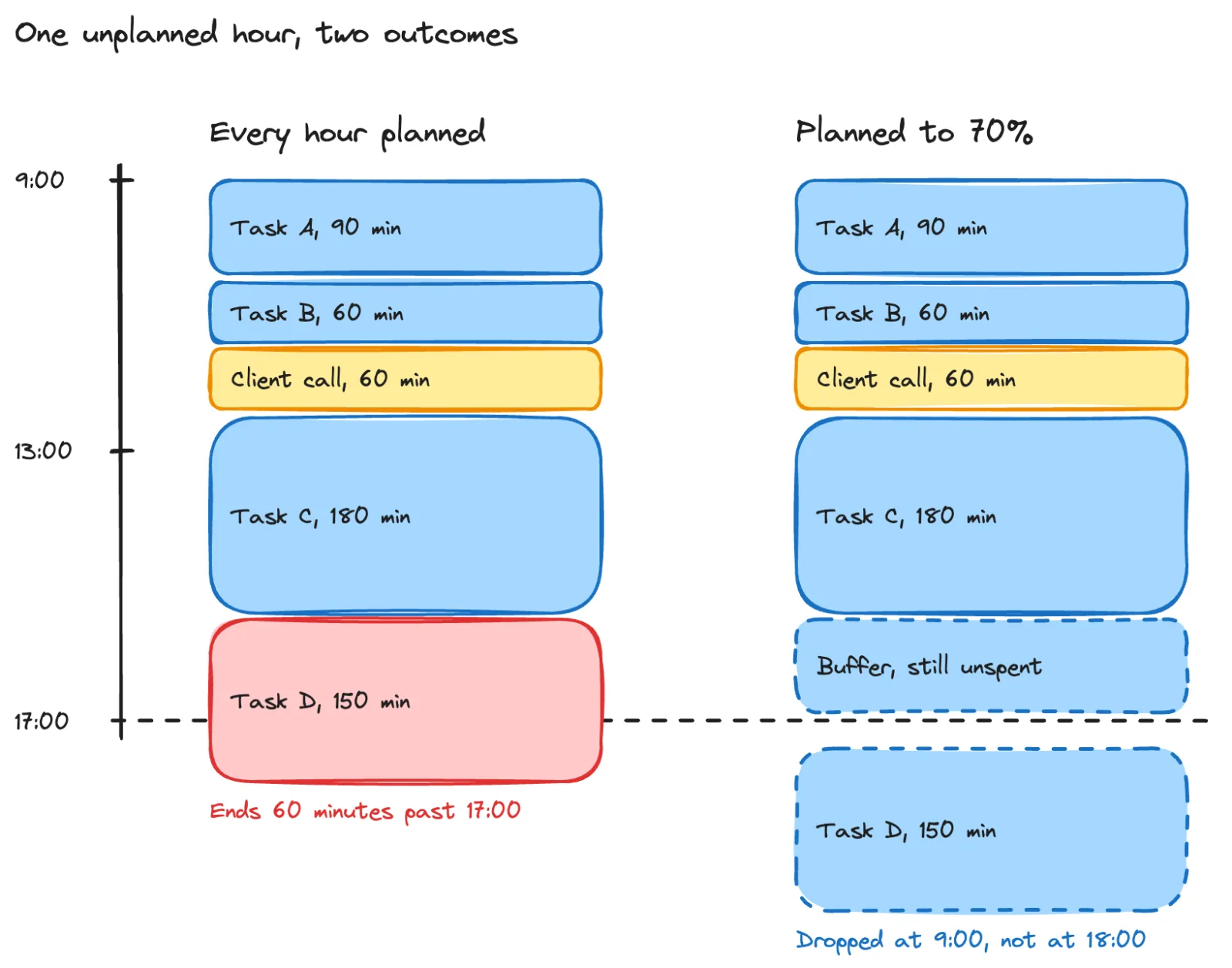
The 70% rule
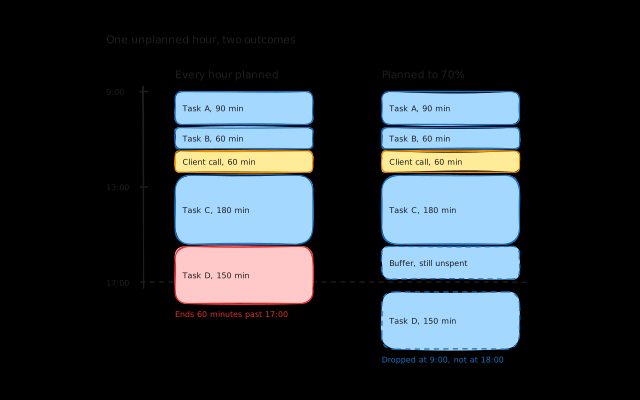
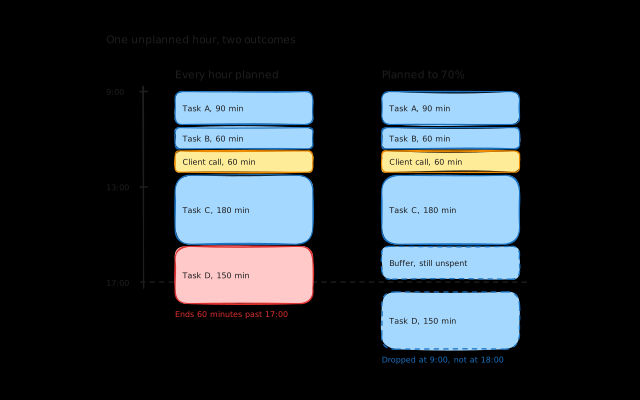
I try to only plan about 70% of my available time. The rest is buffer for things I can’t predict. A new client call comes in and you need to discuss something for an hour. You have to run an errand and there’s a traffic jam. A task takes longer than expected. A Slack message turns into a 30-minute conversation.
If you plan 100% of your day, any single interruption throws everything off. If you plan 70%, you have room to absorb the unexpected without your whole day falling apart.
This doesn’t mean the remaining 30% is wasted. It usually fills itself naturally. But it means you’re not stressed when it does.
Why freelancers get stuck between the two
Most task management tools push you toward one approach. Todoist is a to-do list. Your calendar is a time-blocked schedule. There’s no middle ground where you can have a simple backlog on easy days and a proper scheduled plan on complex days, without switching between two different tools.
For freelancers, this is especially painful because your days aren’t consistent. Monday might be a focused single-client day where a checklist is all you need. Tuesday might have three client meetings, a deadline, and ad-hoc requests coming in on Slack. Those two days need completely different levels of planning.
The tools shouldn’t force you into one mode. They should let you work the way your day demands.
What I’m building into Koaline
This is something I think about a lot with Koaline. I don’t want it to be a tool that forces you to plan every day in detail. Some days you don’t need that, and making people go through a planning ritual when a simple list would do just adds friction.
But when you do need to plan, when the day is complex and you need to be on top of things, the tools should be there. Drag tasks onto a timeline, see your estimates against your available time. Know whether you’re on track at any point during the day.
The goal is a tool that adapts to what you need. Simple list when that’s enough. Full day plan when it’s not. And it shouldn’t feel forced either way.
If you’re interested in a planning tool that doesn’t try to impose a single workflow on you, try Koaline — it’s open and free while in beta — or reach out at david@koaline.app.
Related reading:
- How I Plan My Freelance Week (When I Actually Do It) - My actual weekly planning workflow.
- How I Learned to Stop Saying Yes to Everything - Why seeing your real capacity changes how you plan.
- How I Manage Multiple Clients as a Freelance Developer - The systems behind managing multiple clients at once.