At my busiest, I was juggling four clients at the same time. Most of the time it’s two, which is more manageable but still requires a system. The work itself is never the hard part. The hard part is keeping track of what each client needs, making sure everyone is progressing toward their milestones, and not losing half your day to the overhead of switching between projects.
Here’s what actually works for me.
Think in clients, not tools
When I had multiple clients, my instinct was to think in terms of tools. “Let me check ClickUp. Now let me check Notion. Now Jira.” That’s backwards.
Instead, I think in terms of clients. What does Client A need from me this week? What about Client B? Each client has their own set of active tasks, deadlines, milestones, and context. The tool they use is just where that information happens to live.
In Koaline, this maps to what I call “silos.” Each client gets their own silo, their own space with their own tasks, notes, and context. It doesn’t matter if one client uses Linear and another uses ClickUp. Inside Koaline, they’re organised by client, not by tool.
One client per day when possible
The single biggest thing that improved my productivity was trying to work on only one client per day. Not always possible, but when I can pull it off, it’s a completely different experience.
The reason is simple: switching between clients is expensive. It’s not just the mental context switch. You have to open up the project again, pull the latest changes, sync up on what other people on the team have done, re-read the task to remember what needs to happen. All of that takes time, and it adds up fast if you’re doing it multiple times a day.
When I dedicate a full day to one client, I only pay that startup cost once. I get into the codebase, build momentum, and actually get deep work done. Compare that to splitting a day between two clients, where each switch costs 30-45 minutes of getting back up to speed.
Obviously this doesn’t always work. If Client A has a meeting on Tuesday and Client B has a deadline on Tuesday, I’m splitting the day. But I aim for single-client days as the default and treat split days as the exception.
Prioritise by milestones and momentum
Every client has milestones in the future that need to be hit. The question every week is: which client needs my attention most right now?
I’d love to say I have a formula for this, but honestly it’s mostly gut feeling. Two things tend to drive the decision:
Upcoming meetings. If I have a client call on Thursday, that client gets priority earlier in the week. I want to show up with progress, not excuses. Nothing feels worse than joining a standup and having to say “I didn’t get to it.”
Recent neglect. If I’ve been heads-down on Client A for a few days, Client B starts feeling overdue even if there’s no hard deadline. All clients need to keep moving toward their milestones. If one has been sitting still too long, it gets bumped up.
The danger is that without a clear view of all your commitments, you make these priority calls with incomplete information. You think you can give Client A three more days because Client B’s deadline feels far away, but actually Client B’s milestone is next week and you haven’t started. That’s what happened to me more than once, and it always resulted in overtime to catch up.
Estimate honestly (and then add buffer)
Wrong estimates are the main reason I’ve had to do overtime. Not missed deadlines exactly, but way more hours than I planned because I underestimated the work.
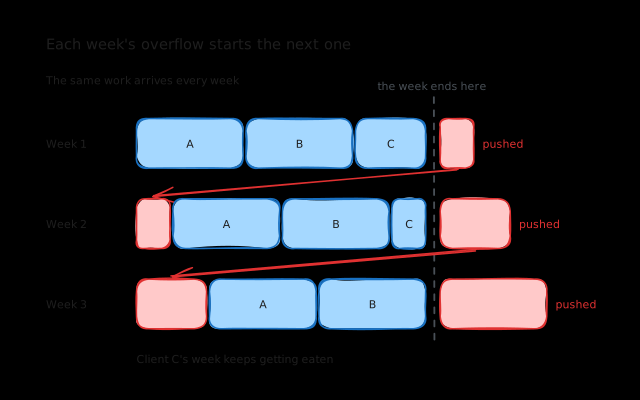
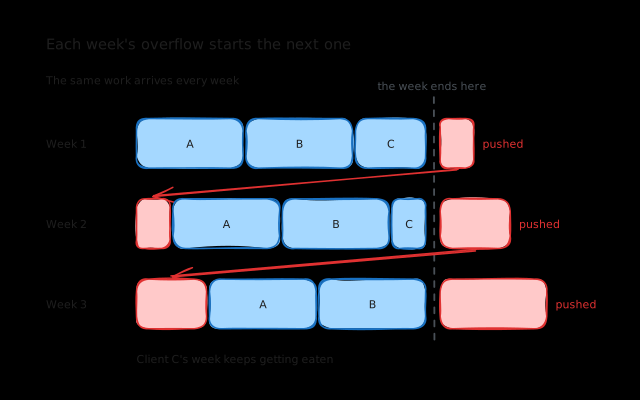
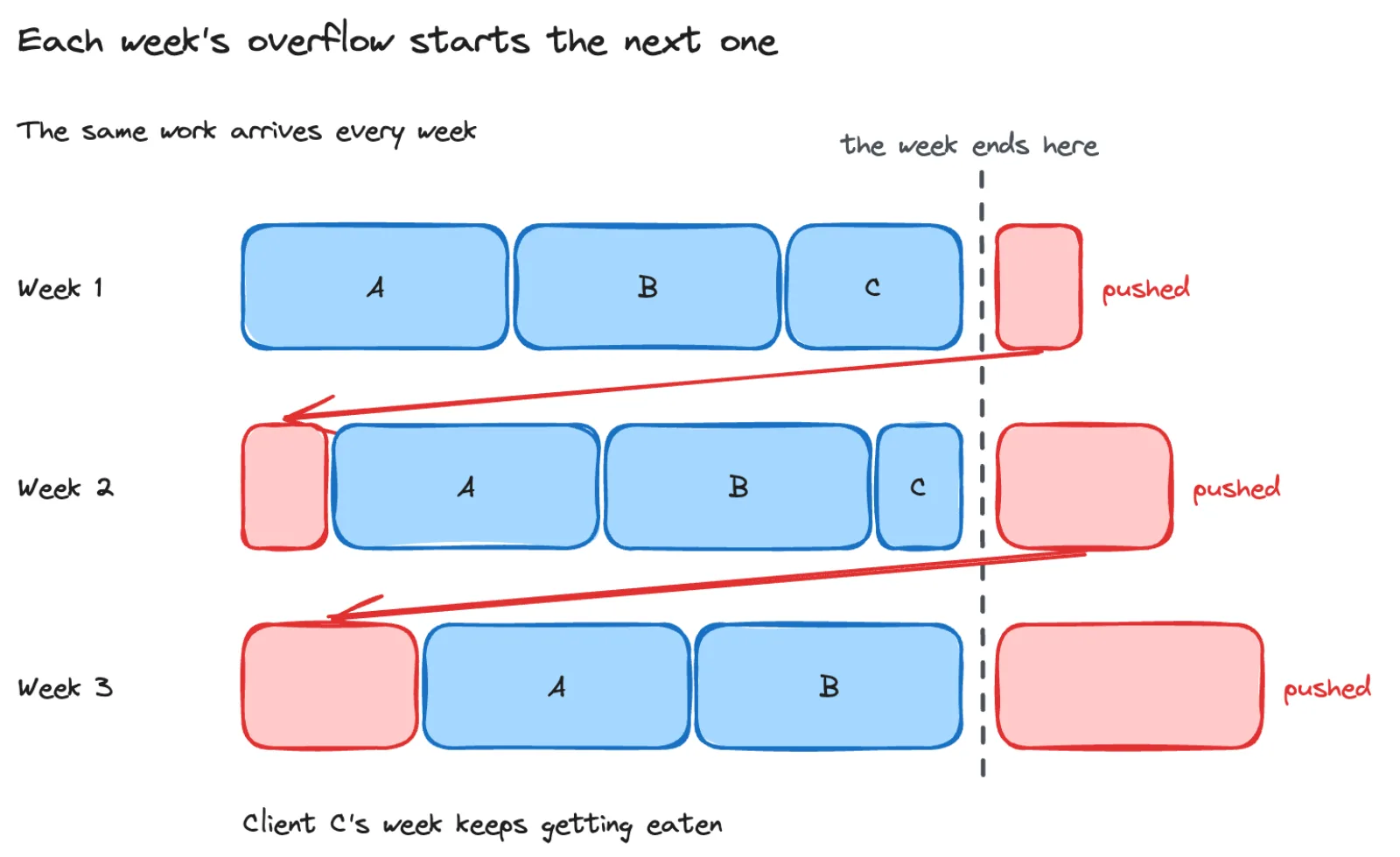
When you’re juggling multiple clients, bad estimates don’t just affect one project. They cascade. If Client A’s task takes twice as long as expected, that’s not just Client A’s problem. It means Client B’s work gets pushed, which means Client C doesn’t get touched this week, which means next week is even more packed.
I try to estimate each task in hours, then add buffer. If I think something takes 4 hours, I plan for 5-6. The buffer accounts for the things estimates never include: syncing up on changes, unexpected bugs, that Slack thread you need to read before you can start.
I wrote more about the estimation and overcommitment cycle in how to stop overcommitting as a freelancer.
Keep context close to the task
The hardest part of switching clients isn’t the work itself. It’s the startup. Opening the project, pulling changes, figuring out where you left off, remembering what was decided in the last meeting.
This is where daily notes make a huge difference. At the end of a work session for a client, I try to write down where I left off. Which branch, what’s done, what’s next, any decisions or blockers. It takes two minutes and saves me 20 minutes next time I pick it up.
This is one of the core ideas behind Koaline’s work mode. Your notes live right next to your tasks, organised by client. When you switch to a different client, the context is right there. You don’t have to dig through Slack threads or try to remember what happened last Tuesday.
The morning decision: who gets today?
Each morning (when I’m being disciplined about it), I look at the week and decide what today looks like. The decision is based on:
- Which client has the nearest deadline or milestone
- Which client I have meetings with soon
- Which client has been neglected
- What tasks are already assigned to today from my weekly plan
Most of the time, the answer is obvious. One client clearly needs attention more than the others. On the days where it’s not obvious, I default to whoever has a meeting coming up soonest, because showing up unprepared is the one thing I want to avoid.
What Koaline does for this
The multi-client juggle is the core problem Koaline solves. Each client gets their own silo with tasks synced from whatever tool they use. You see all your clients’ work in one place, plan your week across all of them, and keep notes and context organised by client.
The goal is to make that morning decision easier. Instead of opening three tools and trying to mentally piece together your priorities, you open one view and see everything. Which milestones are coming up, which clients need attention, what’s already planned for today.
If you’re a freelancer managing multiple clients and this sounds like your life, try Koaline — it’s open and free while in beta — or reach out at david@koaline.app.
Related reading:
- Managing Tasks Across ClickUp, Notion, and Jira Without Losing Your Mind - The tool sprawl problem and how to deal with it.
- Context Switching Is Killing Your Freelance Productivity - Why switching between clients costs more than you think.
- How to Stop Overcommitting as a Freelancer - A capacity-first approach when you can’t see your total workload.