You’re deep in Client A’s codebase. You’ve got the mental model loaded. You know which service handles what, you know the naming conventions, you know the quirks. You’re productive.
Then you need to switch to Client B.
Now you’re opening a different project, a different tech stack maybe, different conventions, different deployment pipeline. The mental model you spent the last two hours building? Gone. You’re starting from scratch.
This is the reality of freelance development. And the cost of these switches is way higher than most people realise, because it’s not just about focus. For developers specifically, there’s real mechanical overhead every time you change projects.
What a client switch actually looks like
When people talk about context switching, they usually make it sound like a focus problem. “It takes X minutes to refocus.” That’s true, but for developers it undersells the real cost. Here’s what switching to a different client project actually involves:
If there are other developers on the project:
- Pull the latest changes from main or dev
- If you have open PRs, you might need to rebase or resolve conflicts with changes that landed while you were away
- Run database migrations if the schema changed
- Possibly rebuild or restart local services
- Read through recent PRs or commits to understand what changed while you were gone
If you’re working solo:
- Pick up where you left off (easier if you wrote notes, painful if you didn’t)
- Re-read the task or ticket to remember what needs to happen
- Plan what needs to be done, break it into manageable chunks
Either way:
- Track down information you didn’t save. That decision from a Slack thread two weeks ago. The API spec someone shared in an email. The design mockup that lives in a Figma link buried in a comment.
- Sometimes you can jump straight into coding. Sometimes the task needs research before you can even start. With AI tools this research phase has gotten significantly faster, but it’s still time you’re spending before any actual output.
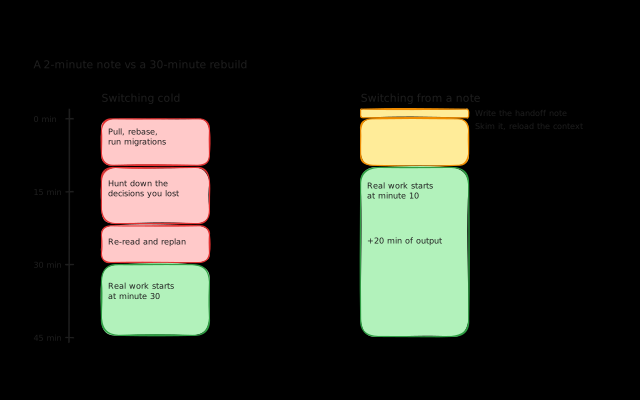
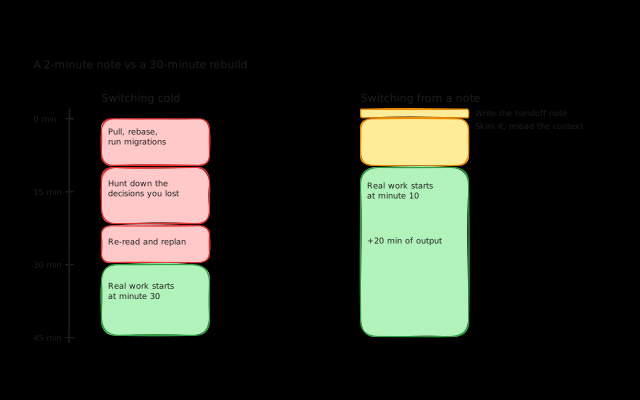
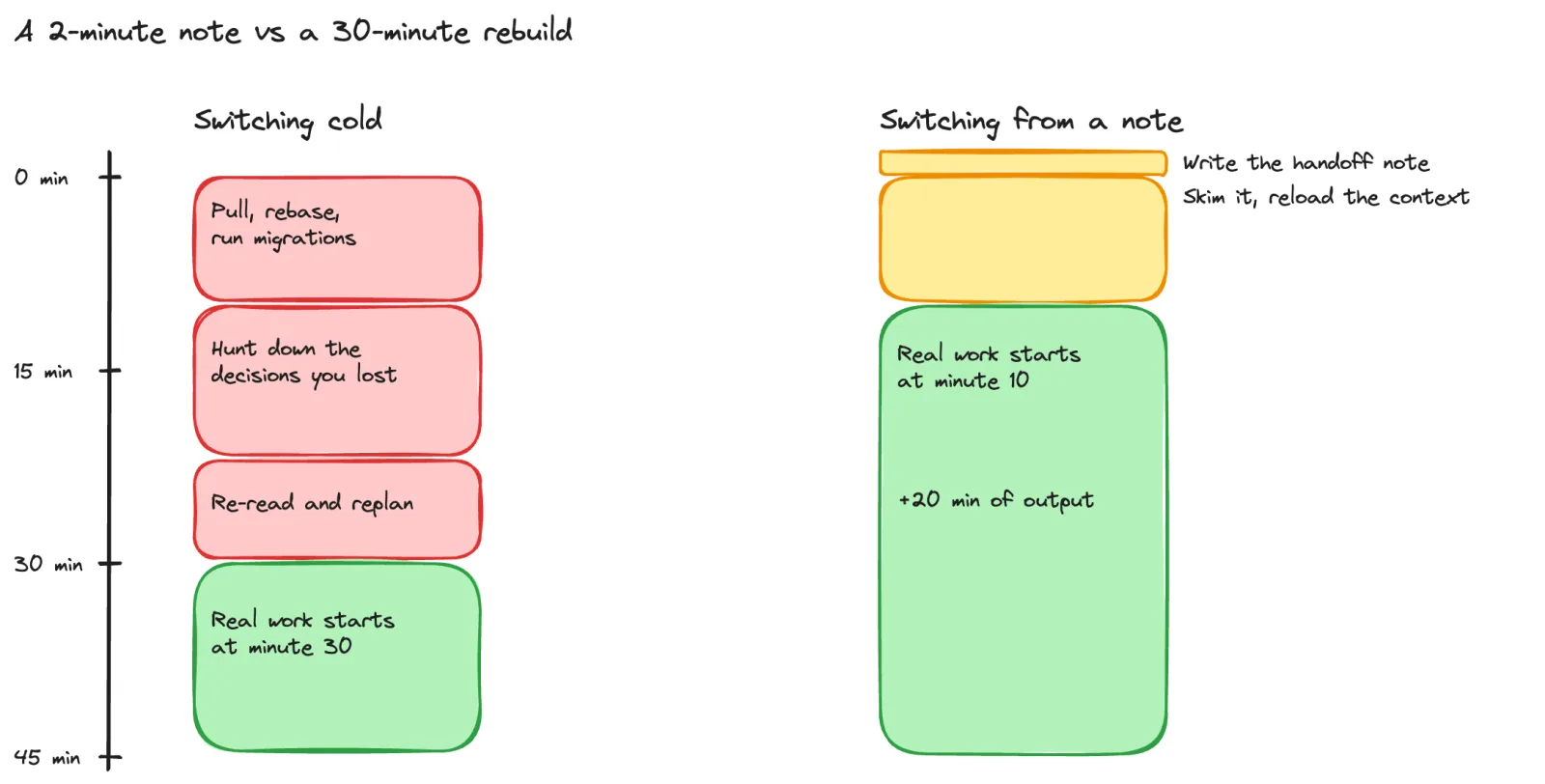
All of this adds up. A “quick switch” to another client can easily eat 30-45 minutes before you write a single line of code. Do that twice a day and you’ve lost over an hour to transitions alone.
The three layers of switching cost
Not every switch costs the same. It helps to think about it in layers.
Tool switching is the lightest. You leave your editor to check a project management tool, then come back. Small cost, but it happens constantly throughout the day and adds up.
Task switching within the same client is moderate. You’re still in the same codebase and mental model, but you need to shift from one problem to another. Going from a bug fix to a feature implementation to a code review, all for the same client, is manageable but not free.
Client switching is the most expensive. You’re swapping everything: codebase, conventions, tech stack, business context, stakeholders. This is the one that costs 30+ minutes and the one worth minimising.
What actually helps
Work on one client per day when you can
I wrote about this in how I manage multiple clients, but it’s worth repeating here because it’s the single most effective thing I do. When I can dedicate a full day to one client, I pay the startup cost once and then get hours of uninterrupted deep work.
It’s not always possible. Meetings, deadlines, and urgencies force split days. But I treat single-client days as the default and split days as the exception.
Write down where you are before you switch
This is the habit that took me way too long to build, and it makes the biggest difference per minute invested.
Before you stop working on a client, take two minutes to write down:
- What you were working on
- What branch you’re on
- What you’d do next if you kept going
- Any decisions you made or information you were holding in your head
That’s it. Two minutes. And it saves you 20 minutes of reconstruction next time you pick it up, because you can get back into the state of mind where you left off instead of starting cold.
The key is that these notes should live with the task, not in a separate document you’ll forget about. In Koaline, task notes are right next to the task itself. When you switch clients, the context is waiting for you.
Don’t track down information twice
Half the pain of client switching is hunting for information. The Slack thread where a decision was made. The email with the API credentials. The Figma link for the designs.
When you find something important, save it with the task or project immediately. Don’t tell yourself you’ll remember where it is. You won’t. Three days from now when you switch back to this client, you’ll be searching Slack history again.
Plan your switches in advance
Most client switches happen reactively. A Slack notification pulls you out of one project and into another. Even if you just “quickly check” the message, your brain has already started loading the other client’s context.
I don’t close notifications for other clients, because I want to be available within reasonable time. But I try to batch my responses. If Client B pings me while I’m working on Client A, I’ll read it, decide if it’s genuinely urgent, and if not, handle it during a natural break or at the end of my Client A block. The message gets a response within a couple of hours, which is almost always fine.
The difference between a planned switch (finish Client A block, take a break, set up Client B’s project, review notes, start) and an unplanned switch (get pinged, scramble to load context, try to help, scramble back to where you were) is enormous.
The developer-specific problem with existing tools
Most productivity advice about context switching is written for knowledge workers in general. “Close your tabs, batch your email, time block your calendar.” That advice is fine, but it misses what makes this harder for developers.
Developers don’t just switch mental contexts. They switch entire environments. Different repos, different branches, different databases, different deployment setups, different terminal sessions. The overhead is physical, not just cognitive.
And the planning tools that exist (Sunsama, Akiflow, even ClickUp) don’t account for this. They help you plan which tasks to do when, but they don’t give you a place to keep the context that makes switching between those tasks faster. Your notes about where you left off, the decisions that were made, the links you’ll need next time.
That’s what I’m building into Koaline. Not just a day planner, but a work mode where your current task, your notes, and your daily agenda live side by side. So when you switch clients, the context is right there instead of scattered across Slack threads and your memory.
If this resonates, try Koaline — it’s open and free while in beta — or send me your thoughts at david@koaline.app.
Related reading:
- How I Manage Multiple Clients as a Freelance Developer - The systems I use to keep multiple clients moving forward.
- How I Plan My Freelance Week (When I Actually Do It) - My actual weekly planning workflow, including when I fall off.
- Why I’m Building Koaline Instead of Using Notion, ClickUp, or Sunsama - The journey that led me to build my own tool.