Before I started building Koaline, I spent years trying to make existing tools work for my freelance workflow. Notion, ClickUp, Sunsama, Akiflow. Each one got some things right, but none of them gave me the full picture. Here’s the journey that led me to building my own tool.
Notion: flexible, but never quite right
Notion was my first real attempt at organising my freelance work. And on paper, it should have been perfect. You can build anything in Notion. Databases, dashboards, kanban boards, calendars, whatever you need.
The problem is that “you can build anything” also means “you have to build everything.” I spent hours setting up templates, tweaking database views, linking things together. And even after all that work, it never felt quite right. The task management experience always felt like I was fighting the tool instead of using it.
Notion is great for specific use cases. Documentation, wikis, knowledge bases. But as a daily workspace for managing tasks across multiple clients? It’s too flexible. You spend more time configuring than working.
After a few months, I switched to ClickUp.
ClickUp: better, until it wasn’t
ClickUp was a big step up. It did task management well out of the box. I didn’t have to build my own system from scratch. Planning, timeboxing, time tracking, it was all there. For a while, it was exactly what I needed.
I wrote about what eventually broke with ClickUp in more detail, but the short version is: it works great as long as all your work lives in one workspace. The moment a client moves to their own workspace, or you need to pull tasks from Notion or Jira, the whole system falls apart.
On top of that, ClickUp kept adding team features I didn’t need. New navigation bars, collaboration tools, features designed for teams of 20. The interface got more cluttered over time, and as a solo freelancer, most of it was noise.
Sunsama and Akiflow: close, but missing something
After ClickUp, I tried the tools that are specifically designed for intentional day planning.
Sunsama is genuinely great. It’s probably the closest thing to what I wanted. You pull tasks from your other tools, plan your day, timebox everything. The planning experience is really well done, and it’s a big inspiration for Koaline.
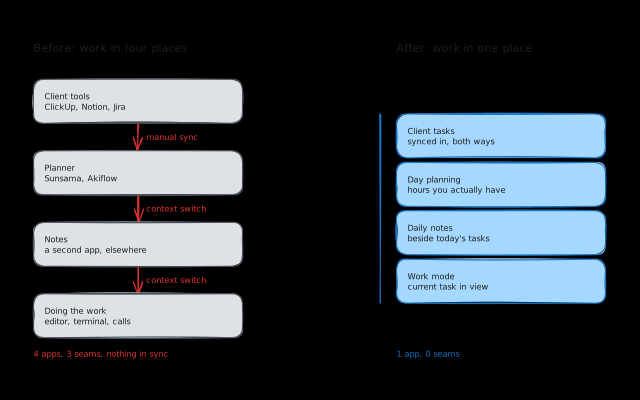
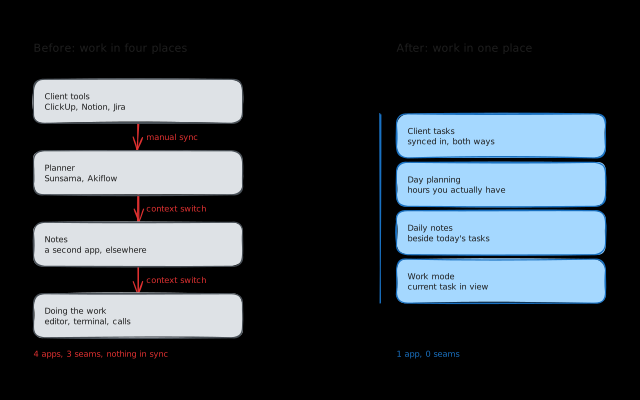
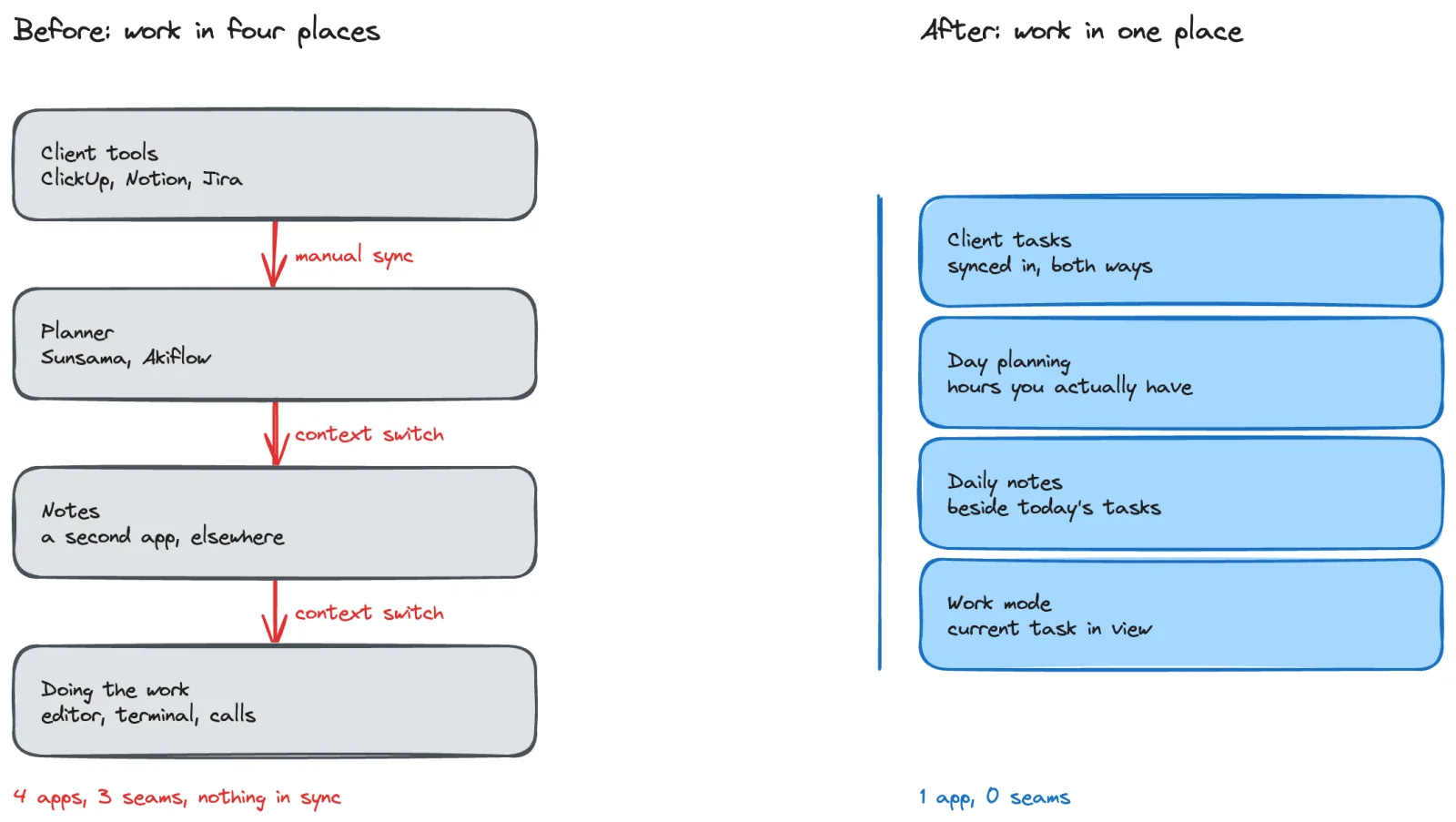
But Sunsama is missing one thing that matters a lot to me as a developer: there’s no place to actually work inside the app. You plan your day in Sunsama, and then you leave it. There’s no daily notes view, no place to jot down thoughts alongside your tasks, no “work mode” where you can see your current task, your daily agenda, and your notes all in one place.
That might sound minor, but most developers I know take daily notes in some form. Whether it’s decisions made during a task, things to follow up on, or just a running log of what they did today. Having that live next to your task list, inside the same tool you plan in, changes how the whole day feels. You don’t have to context-switch to a separate app just to write something down.
Akiflow didn’t click with me at all. I gave it a fair shot, but it just didn’t fit how I think about my work.
What I actually needed
After going through all of this, I had a pretty clear picture of what was missing. Not a project management tool. Not a note-taking app. Not a calendar. Something that combines the parts that actually matter for a freelance developer:
Task aggregation. Pull tasks from whatever tools my clients use (ClickUp, Notion, Linear, Jira) into one place, with bidirectional sync so I’m not maintaining two systems.
Day planning with time awareness. Not just a list of tasks, but a view that accounts for how many hours I actually have and helps me decide what fits today.
A work mode. A view where I can see my current task, my daily agenda, and my notes side by side. Plan the day, then work the day, all in the same place.
Lightweight enough to come back to. I don’t plan every day (I wrote about that honestly in how I plan my freelance week). Whatever I build needs to make it easy to pick back up after a few days off, not punish me for skipping a day.
Why I started building Koaline
I didn’t set out to build a product. I set out to build the tool I needed for myself. None of the options on the market gave me everything in one place, and I was tired of stitching together three tools with manual syncing and Zapier automations.
You can think of Koaline as Sunsama for developers. The intentional day planning is there, but with proper note-taking built in, integrations with the tools developers actually use, and a work mode that lets you stay in one place throughout the day.
If you want the side-by-side version, I compared Koaline with Notion, Sunsama and ClickUp.
It’s still early. I’m building this based on my own experience, and I know not every freelancer works the way I do. If you’re a freelancer or independent developer and any of this resonates, I’d love to hear how you work. What tools are you using? What’s missing? What drives you crazy?
Send me an email at david@koaline.app, or try Koaline — it’s open and free while in beta.
Related reading:
- Managing Tasks Across ClickUp, Notion, and Jira Without Losing Your Mind - The full story of how my ClickUp setup broke down.
- How I Plan My Freelance Week (When I Actually Do It) - My actual weekly planning workflow, including the parts where I fall off.
- Why Day Planning Beats To-Do Lists for Freelancers - Why “what am I doing today?” matters more than “what needs doing?”