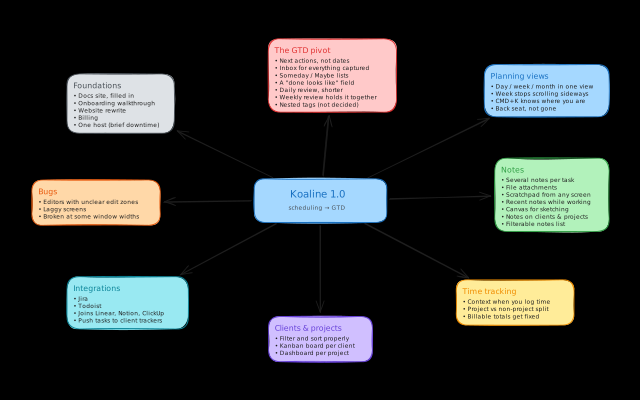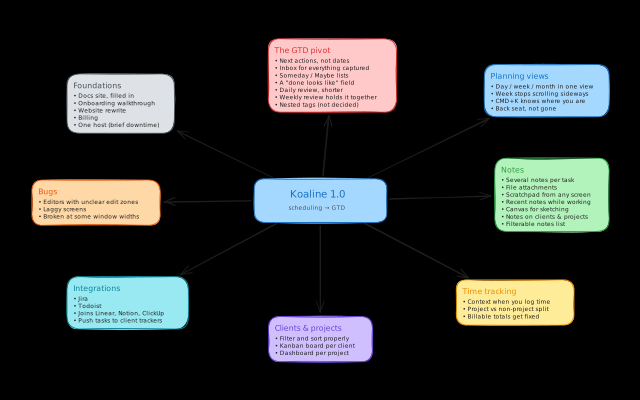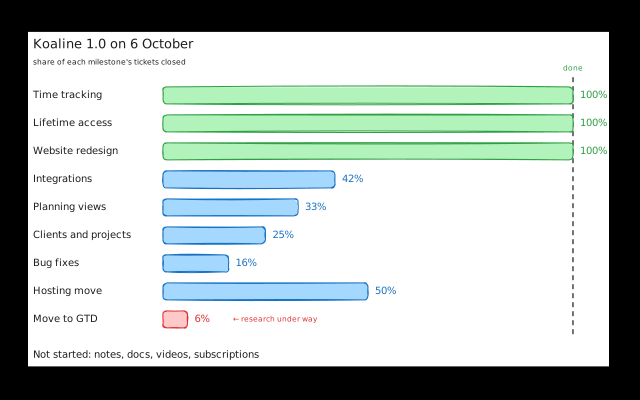
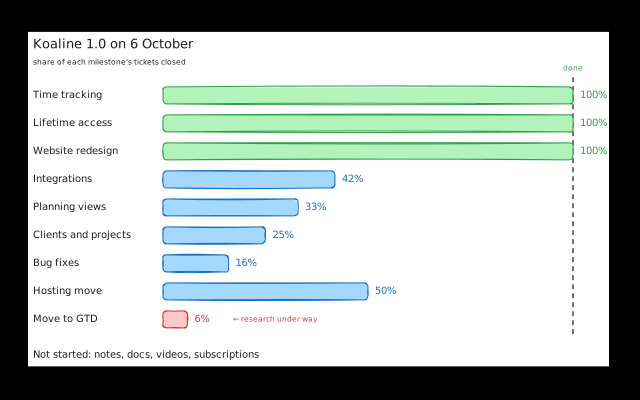
The biggest item on the Koaline 1.0 roadmap is moving Koaline from scheduling to Getting Things Done, the method better known as GTD. Five weeks later, that move is 6% done. That’s on purpose, and the reason is further down.
If you’re new here: Koaline pulls your tasks from Linear, Notion, ClickUp and Jira into one list, with day planning and time logging. It’s for freelancers and anyone who works for several clients.
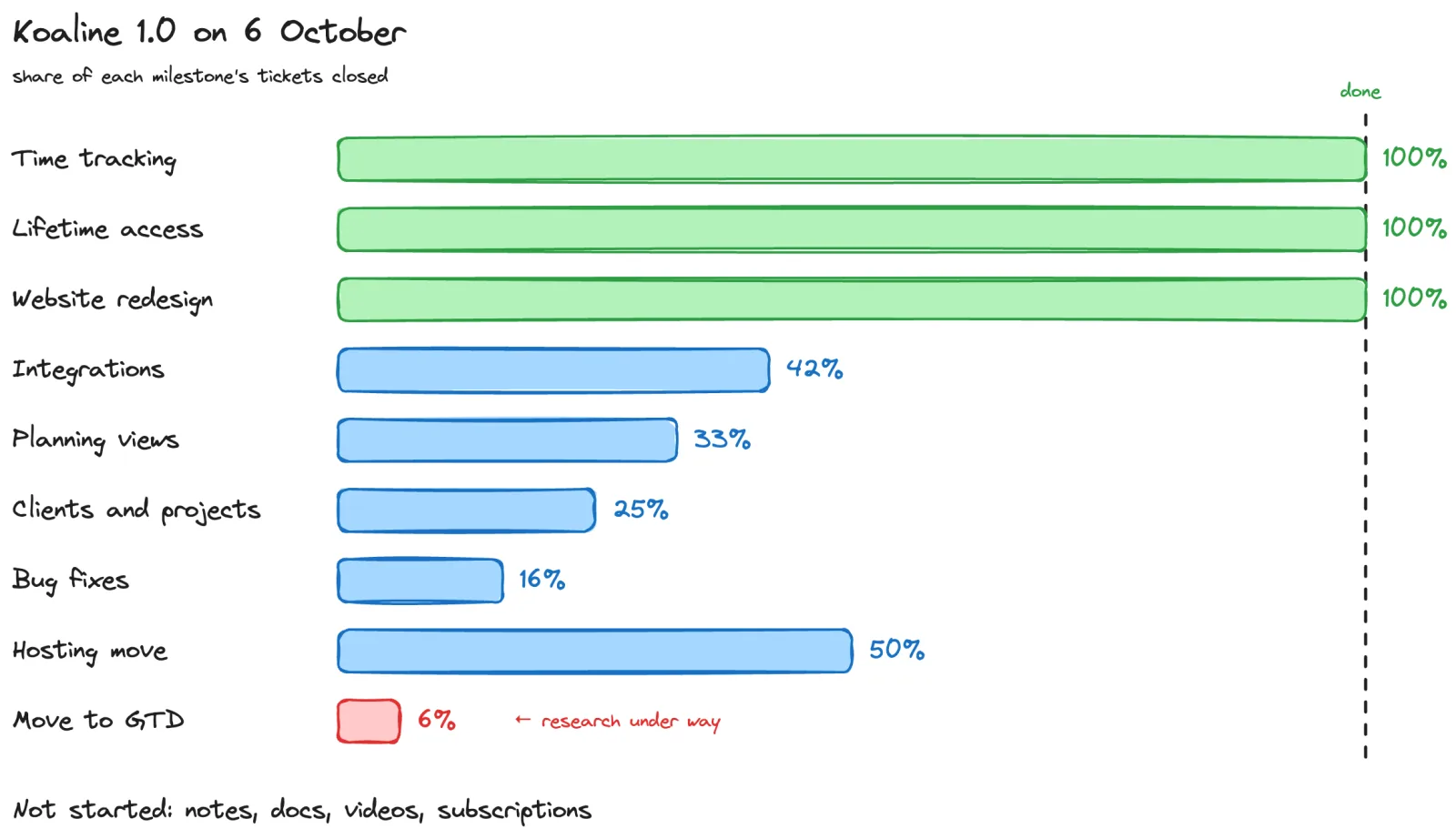
Each bar is the share of that milestone’s tickets we’ve closed in Linear. A ticket isn’t a fixed amount of work, so 50% doesn’t mean halfway. Read the chart as a rough picture.
What shipped
Time tracking is done
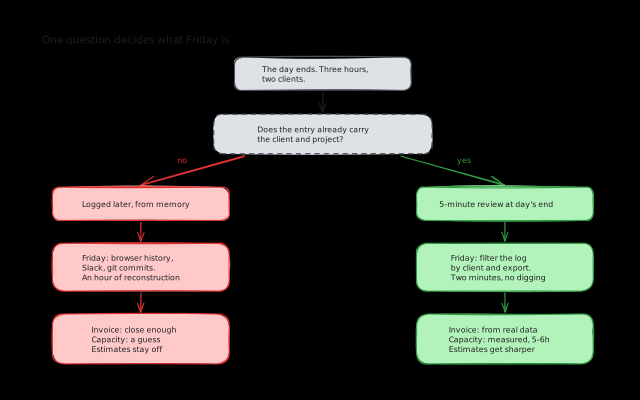
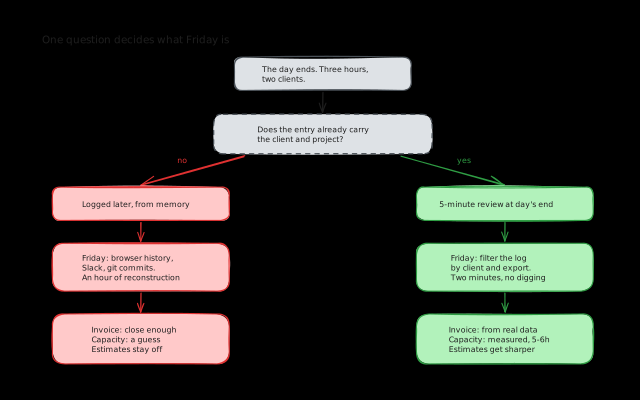
When you log time for a past day, you now see that day next to the form. You see the tasks you planned, the ones you finished, the time you already logged, and the day’s note. You fill in the hours from what’s in front of you instead of from memory.
Time logged against a project no longer mixes with time logged without one. If you invoice from Koaline’s totals, they add up now.
Jira Cloud and Data Center sync
Koaline now connects to Jira Cloud and Jira Data Center, alongside Linear, Notion and ClickUp. Task details sync back to Jira.
Changes from Jira Cloud arrive as they happen, instead of once a day. On Jira Data Center, an admin can install the same webhook by hand. If one Atlassian login gives you several Jira sites, Koaline connects all of them and keeps their tasks apart.
If a client of yours runs Jira, you can connect it now while Koaline is free in beta. Todoist is in progress.
Notion sync works both ways again
You’d only notice most of this if it went wrong, and some of it did.
Notion sync was broken in places. It works in both directions again, and the page title and body now come through into Koaline. Two syncs running at the same moment could also create the same task or label twice. That’s fixed for every integration.
Clients have a real page
The roadmap promised a board per client. Opening a client now shows:
- that client’s tasks on a board grouped by status, or as a list
- stats and recent activity
- the time you’ve logged for them
- their projects
Project pages got the same redesign. The lists of clients and projects are next. Filtering and sorting there still don’t work like the rest of the app.
Two things that weren’t on the roadmap
Absences. A day off used to look exactly like a day I forgot to log. Now you can mark a day as Vacation, Sick leave or Day off, one day or a whole range at once. The time dashboard counts how many of each you’ve taken this year. The timelog export can list them next to your hours.
Breadcrumbs. The top bar shows where you are. Open a task from a client page and the trail shows that client, so getting back is one click.
A new website
We rewrote the website so it says what Koaline does and who it’s for. Then we checked every claim on it against the app.
Lifetime access is live
There are 50 believer seats at €99, paid once, and a seat covers the 1.0 subscription. We opened them first because the money pays for the rest of the work.
Why GTD is at 6%
The roadmap led with the move to GTD, and it’s the furthest behind. That’s deliberate.
GTD only works if you trust the system to hold everything. If a Jira ticket shows up a day late, the inbox is wrong. If a sync creates the same task twice, the inbox is wrong. A wrong inbox is the same problem that made us leave scheduling: you open the app, see something you know is out of date, and close it again.
So most of what shipped in the last five weeks is groundwork for GTD. A task from Jira or Notion has to arrive once, and on time. The hours you log have to be right.
The GTD work itself is in research now. The open question is how next actions, an inbox and Someday lists fit into what Koaline already does, without breaking how you use it today. Nested tags are still undecided.
What’s next
Not ranked, same as before:
- GTD moves from research to building.
- Planning views are a third done. We’ve worked out how the week view can fit the screen without squeezing task cards. Building that, and merging day, week and month into one view, comes next.
- Bug fixes sit at 16% because the list grows as we go through the app. We fix what we find, and we keep finding more.
- Notes haven’t started. Several notes per task, attachments and a scratchpad are all still ahead.
- Todoist joins the integrations.
- Client and project lists get filtering and sorting that match the rest of the app.
- Hosting. We’ve picked where everything moves to. The move hasn’t happened yet. Expect a short spell of downtime, announced beforehand.
- Docs, onboarding videos and subscriptions haven’t started.
Still no dates. If something slips, we’ll say so here.
If any of this doesn’t match how you work, tell me. I read everything sent to david@koaline.app.
You can try Koaline while it’s in beta. It’s free. If you want to back it, there are 50 believer seats at €99, paid once, and a seat covers the 1.0 subscription.
Related reading:
- The Koaline 1.0 Roadmap - The plan this post reports against.
- Managing Tasks Across ClickUp, Notion, and Jira Without Losing Your Mind - Why every tracker feeds one list.
- How I Track Time Across Multiple Client Projects as a Freelancer - The problem the time tracking work fixes.