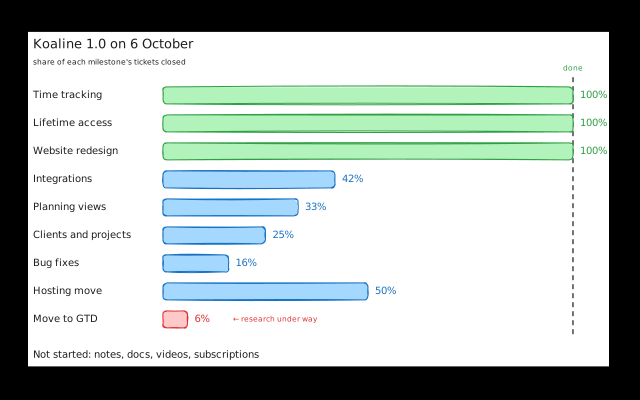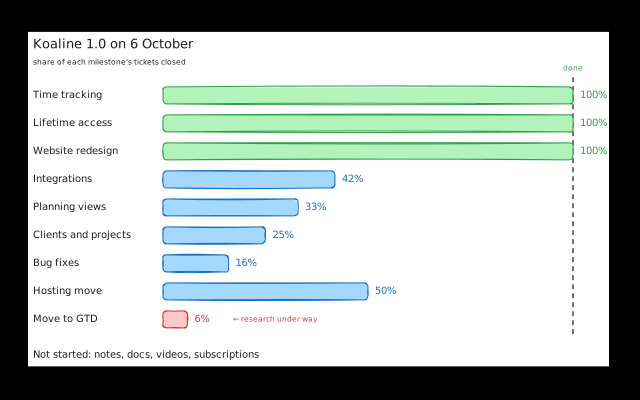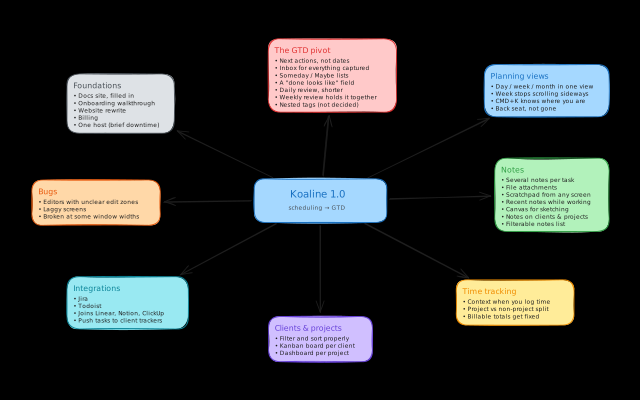
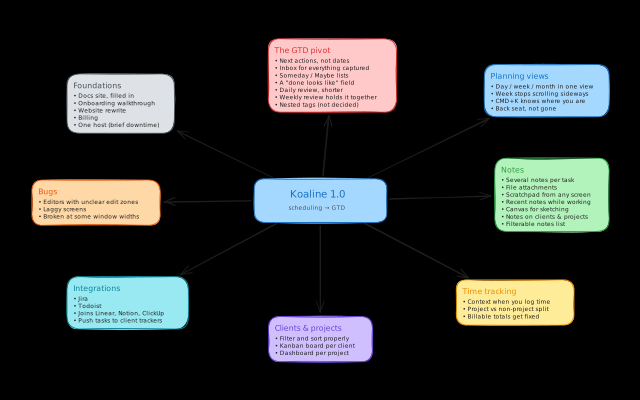
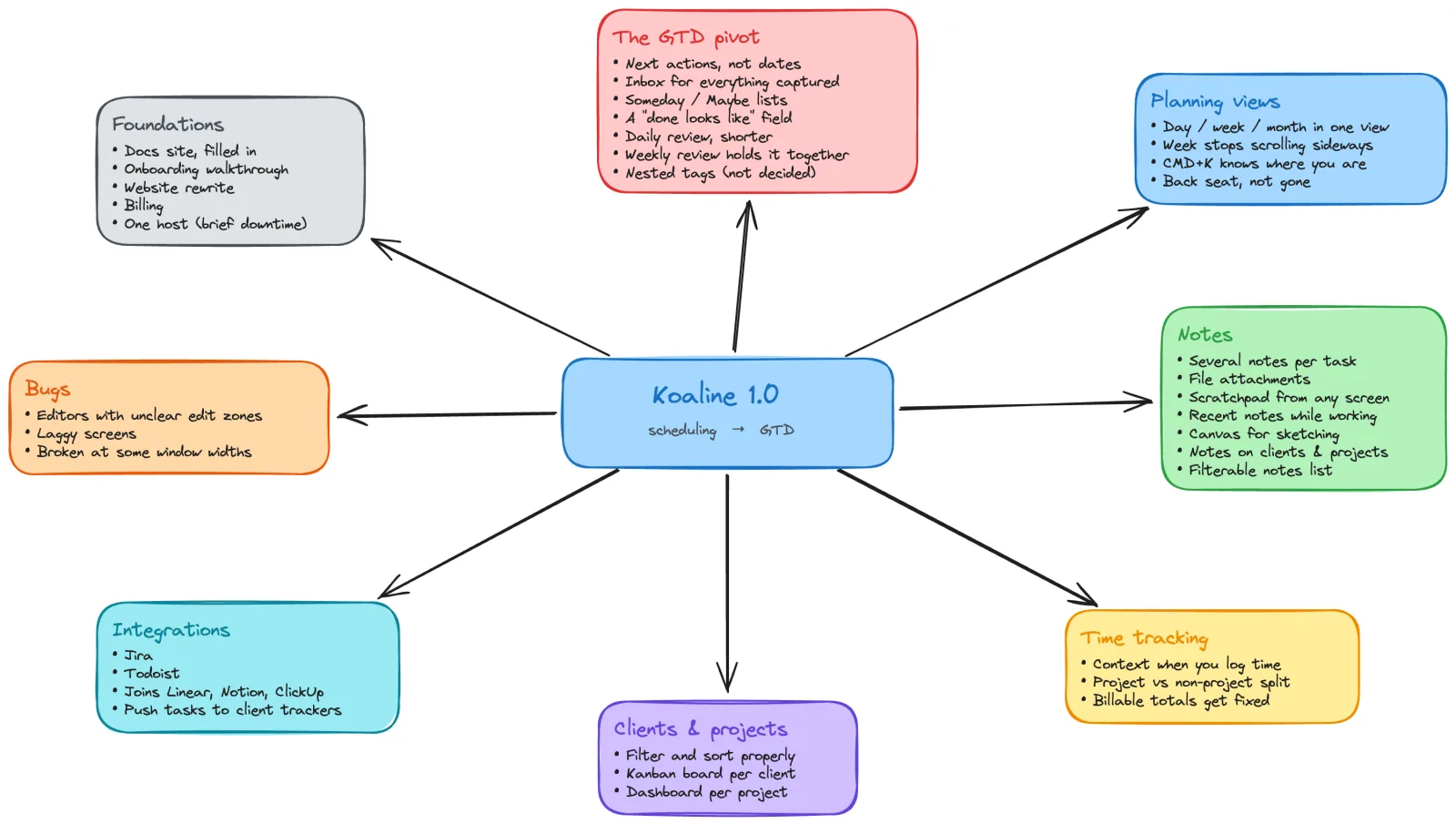
This is everything we’re building before Koaline 1.0.
One item is a change of direction, and it gets a proper explanation. The rest is a list. Nothing in it is ranked, the order will shift as we go, and we’d rather not promise you one we can’t keep.
Update, 6 October: here’s what we’ve shipped since.
Koaline came out of my own problem. As a freelancer I had tasks scattered across a different tool for every client. I’ve taken a full time job since then and nothing changed. Every client at work runs their own tracker, and I still want the lot in one place.
Koaline is becoming a GTD app
This is the big one, so it comes first.
Koaline was built around scheduling. Put the work on a calendar, give every task a slot, work the calendar.
Boxing out a single day works. I still do it. The problem starts the moment you schedule forward.
A task you didn’t finish today has to land somewhere, and it lands on tomorrow, which was already full. Plan a whole week that way and the week is wrong by Tuesday. Plan a month and you spend the month rescheduling instead of working.
Do that a few times and you stop believing the plan. You open the app, see something you already know is out of date, and close it again.
I ran my own client work like that for a long time. If I weren’t building Koaline, I would have stopped using it.
So I went looking for a better model and landed on GTD.
What GTD is, briefly
GTD stands for Getting Things Done, a method David Allen wrote about in 2001. The core idea is simple. You don’t decide when you’ll do something before you’ve decided what the next step actually is. Everything you’ve captured goes into one inbox. You sort it into lists. You review those lists on a schedule so you can trust them.
That’s the whole trick: the system holds the work, so your head doesn’t have to.
When I read it properly, I looked back at what I’d already shipped in Koaline. The capture flow, the work view, the end of day ritual. I’d built a partial GTD system by accident, without ever having read the book.
What changes in the app
- Tasks get a next action instead of a date
- An inbox holds anything you’ve captured but not sorted
- Someday and Maybe lists stay out of your week until you go looking
- A new field records what “done” actually looks like
- The daily review gets shorter, and you can tick it off where you already are
- The weekly review becomes the one that keeps the system honest
We’re also considering nested tags, where clients/acme/website is a single tag you can filter several ways. That one isn’t decided. It happens if there’s time and if people want it.
Planning views
Planning matters less in a GTD app, so these move out of the centre. They don’t go away.
Day, week and month currently live on three separate pages, which means changing timescale drags you out of wherever you were. They become one view with tabs. The week view stops scrolling sideways. The command centre learns where you are, so CMD+K stops offering you the same things on every screen.
Notes
This is the weakest part of the app, and I use it every day, so I feel it.
Right now a task gets one note. You can’t attach a file. You can’t write anything down without navigating somewhere else first.
Here’s what’s coming:
- Several notes per task
- File attachments you can download whenever you want
- A scratchpad you can reach from any screen
- Recent notes visible while you’re working
- A canvas for sketching
- Notes that appear on a client or project after you write them
- A notes list that filters like every other list in the app
Time tracking
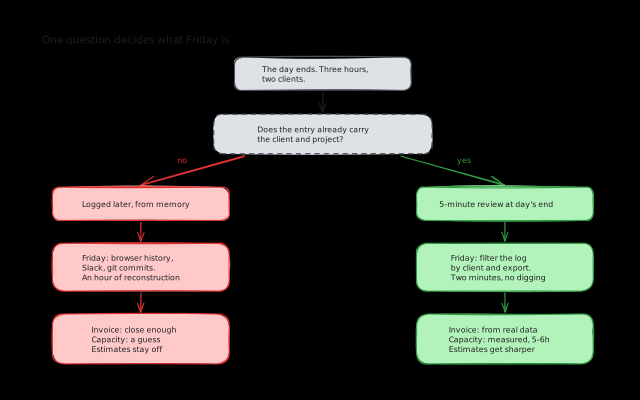
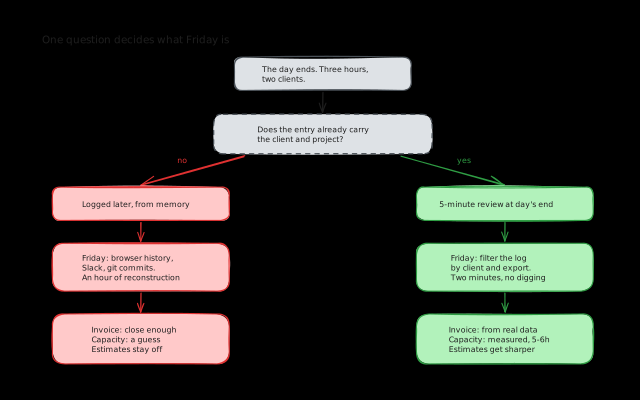
Log time for a past day and you’ll see that day’s notes and finished tasks next to the form, so you’re not reconstructing the day from memory.
We’re also fixing how entries group. Time tracked against a project currently mixes with time tracked without one, which makes billable totals wrong. If you invoice from those numbers, this is the one to care about.
Clients and projects
Clients and projects are lists today. Filtering and sorting don’t work the way they do elsewhere in the app, which is the first thing to fix.
Then they get more than that. Each client and each project gets its own kanban board and its own dashboard, so opening a client shows you where that work stands instead of a list of rows. Some of that lands at 1.0, the rest after.
Bugs
We’ve been carrying a list for a while, and we’re working through all of it rather than just the obvious ones. Editors where you can’t tell where you’re allowed to type. Screens that lag. Views that break at certain window widths.
Everything else
Smaller in scope, still happening:
- Jira and Todoist join Linear, Notion and ClickUp. You’ll also be able to push a private Koaline task out into whatever tracker your client uses, without retyping it.
- Documentation and onboarding get built. Both are close to non existent today. The docs site gets a guide for each part of the app, plus short videos where watching beats reading. Onboarding gets a proper first run walkthrough.
- The website gets rewritten so it says what Koaline is and who it’s for.
- Billing gets built. Today there’s no checkout, no plans, and no way to manage a subscription.
- Hosting moves onto one platform. Koaline is spread across several right now, which makes it harder to keep reliable. Expect a short spell of downtime, announced beforehand.
Where this list came from
I use Koaline every day, for my own work and for the client work that comes with my job. Nearly everything above came out of that. A bug I hit. A screen that annoyed me. A step that took longer than it should have.
I’ll keep using it whether or not it finds an audience, because I need it to do my job.
Why there are no dates
We’re building a lot at once, and things take longer than planned. If something slips, we’ll say so rather than quietly ship it half finished. The list is more reliable than any schedule we could staple to it.
If something here doesn’t match how you work, or you think GTD is the wrong direction entirely, tell us now rather than after we’ve built it. I read everything sent to david@koaline.app.
You can try Koaline while it’s in beta. It’s free. If you want to back it, there are 50 believer seats at €99, paid once, and a seat covers the 1.0 subscription.
Related reading:
- To-Do Lists vs Day Planning: You Need Both as a Freelancer - Where a checklist stops being enough.
- How I Plan My Freelance Week (When I Actually Do It) - The loop this rewrite is built around.
- The Hardest Part Isn’t the Work. It’s Starting. - Why next actions beat time slots for getting moving.